Skip to the main content.
Why SchoolTool?
See SchoolTool in Action
Mindex icon for New York focus.
NY-Focused SMS Designed for New York State Schools
Mindex icon for Built by Mindex webpage.
Built by Mindex Rochester's #1 Software Developer
Mindex icon for all-in-one solution.
All-In-One Solution Everything You Need from Day One
Mindex icon for SchoolTool 20 Min On-Demand Overview Video.
Watch On-Demand Overview Get a Quick Preview of SchoolTool
Mindex icon for personalized Product Demo.
Request a Personalized Demo Discover Why SchoolTool is New York's #1 SMS


SchoolTool Features
Partner with SchoolTool
Mindex icon for New York State reporting & requirements.
NYS Requirements & Reporting Meeting the Needs of New York State Schools
Mindex icon for BOCES.
BOCES & Home Districts Streamlined Data Integration for BOCES and Districts
Mindex Icon for Data Visualization
Data & Analytics Dashboards, Reports & Seamless Exports
Mindex icon for scheduling and attendance
Scheduling & Attendance Effortless Student Attendance & Scheduling
Mindex icon for grading.
Grading Streamline Grading with Our Easy-to-Use Gradebook
Icon that represents SchoolTool's College, Career, and Civic Readiness Module
College, Career, and Civic Readiness Empowering Counselors. Tracking Success. Helping Students Succeed.
Mindex icon for ease of use.
Ease of Use User-Friendly Technology, Built for Everyone
Mindex icon for product feature list.
Feature List Role-Based Features to Empower Every User
Mindex icon for partnerships.
Partnerships & Integrations Integrate with a Third-Party Apps


Mindex icon for partnerships.
Partnerships & Integrations Building Stronger Educational Futures Together
Comprehensive Support and Training for SchoolTool
Need Help? Contact Our Support Team!
Mindex icon for Cloud Hosting
Security & Cloud Hosting Secure, Scalable, and Reliable Cloud Hosting
Mindex Icon for Cloud Migration
Data Migration & Implementation Seamlessly Migrate Your Data to the Cloud
Mindex-Mega-Menu-Icons-Community-Support
Community & Support Building Connections, Empowering Feedback, and Shaping the Future of SchoolTool Together
Mindex icon for training certificate
Training & Certifications Advance Your Skills with Expert Training and Certification from SchoolTool
Mindex icon for support specialist.
Contact Support Need Help with SchoolTool? We're Here to Assist You!

customer support person sitting at computer-01

Latest Insights & Product Updates
Spotlight: News & Trending
Mindex icon for SchoolTool Spotlight Blog.
SchoolTool Spotlight Stay connected with SchoolTool! Discover the latest education trends, product updates, and key release highlights for our student management system.
Mindex icon for product update notification.
Product Updates Take a Look at Our Latest Release Updates
Mindex-Mega-Menu-Icons-Case-Studies
Case Studies SchoolTool Customer Stories
Mindex icon for events.
Webinar & Events Calendar Connect, Learn, and Grow

Empowering K-12 Leaders: Author Dashboards to Fit Your District's Needs

Attendee watching Mindex Advanced Analytics Webinar

Read our Latest Blog Post

Products for Education
See Our Education Products in Action
Icon for Mindex SchoolTool
SchoolTool® Built for New York State K–12 schools, this all-in-one student management system offers intuitive, data-driven, and time-saving tools to manage student information.
Icon for Mindex ClearTrack
ClearTrack™ New York State’s leading special education management software, offering flexible, all-in-one tools to simplify IEPs, Medicaid, reporting, and compliance for K-12 districts statewide.
Icon for Mindex MTSS Edge
MTSS Edge™ A customizable MTSS platform for K-12 schools nationwide, managing academic, behavioral, and social-emotional supports in one place.
Icon for Mindex Advanced Analytics
Advanced Analytics™ A flexible data visualization platform that serves K–12 districts and higher education institutions nationwide, transforming student data into clear, actionable insights.

College, Career, and Civic Readiness

Empowering Counselors. Tracking Success. Helping Students Succeed.

Our easy-to-use CCCR module gives New York schools one organized place to monitor academic progress, career preparation, and civic engagement—aligned with the state’s Portrait of a Graduate and the emerging One Single Diploma model.

Built to Support New York Counselors and District Staff

Readiness requirements often end up scattered across spreadsheets, binders, and different systems. SchoolTool CCCR brings everything together in one clear location so teams can quickly see where students stand and support them with confidence.

 
Attendance report

Keep Graduation Pathways Organized

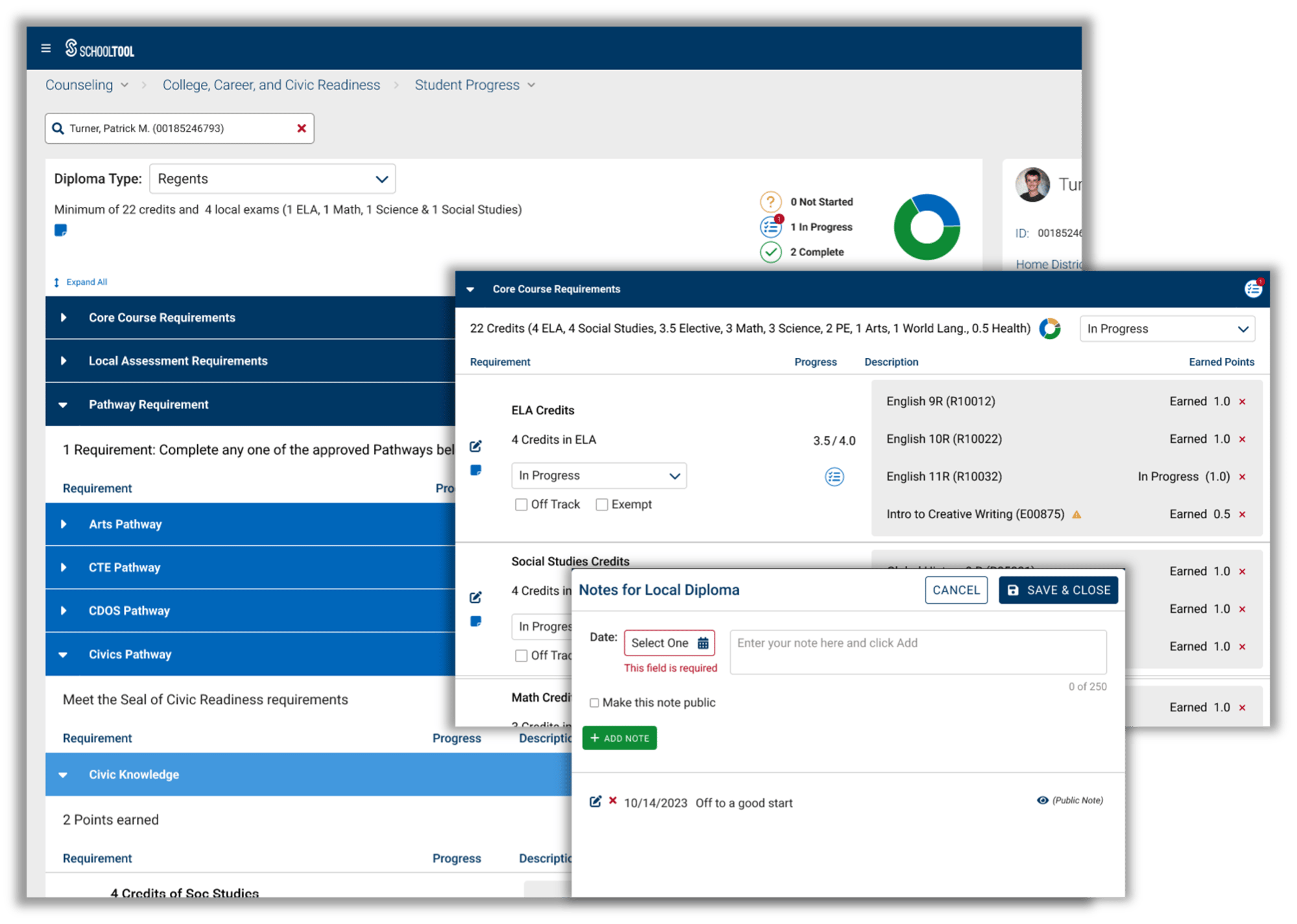
All requirements for Regents, CTE, CDOS, project-based options, and emerging One Single Diploma structures appear in one organized view.

New York State Portrait Graduation Icon

Track Portrait of a Graduate

Monitor the skills and experiences outlined in NYSED’s Portrait of a Graduate using simple, customizable categories.

Seal of Civic Readiness New York State Icon

Support Seal of Civic Readiness

See community service, civic engagement, and work-based learning progress in one organized place.

Counselor Icon

Make Readiness Easier for Staff

Intuitive summaries, color indicators, and clear workflows help teams work confidently without extra steps.

Comprehensive Student View

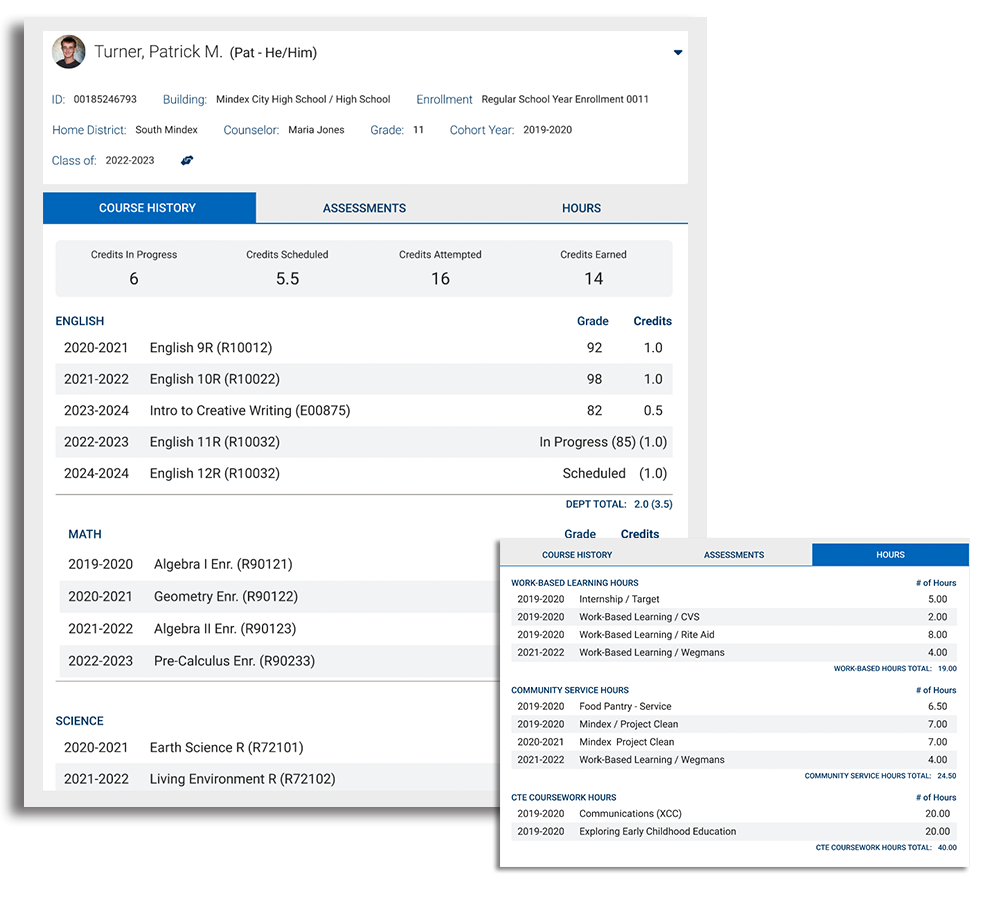
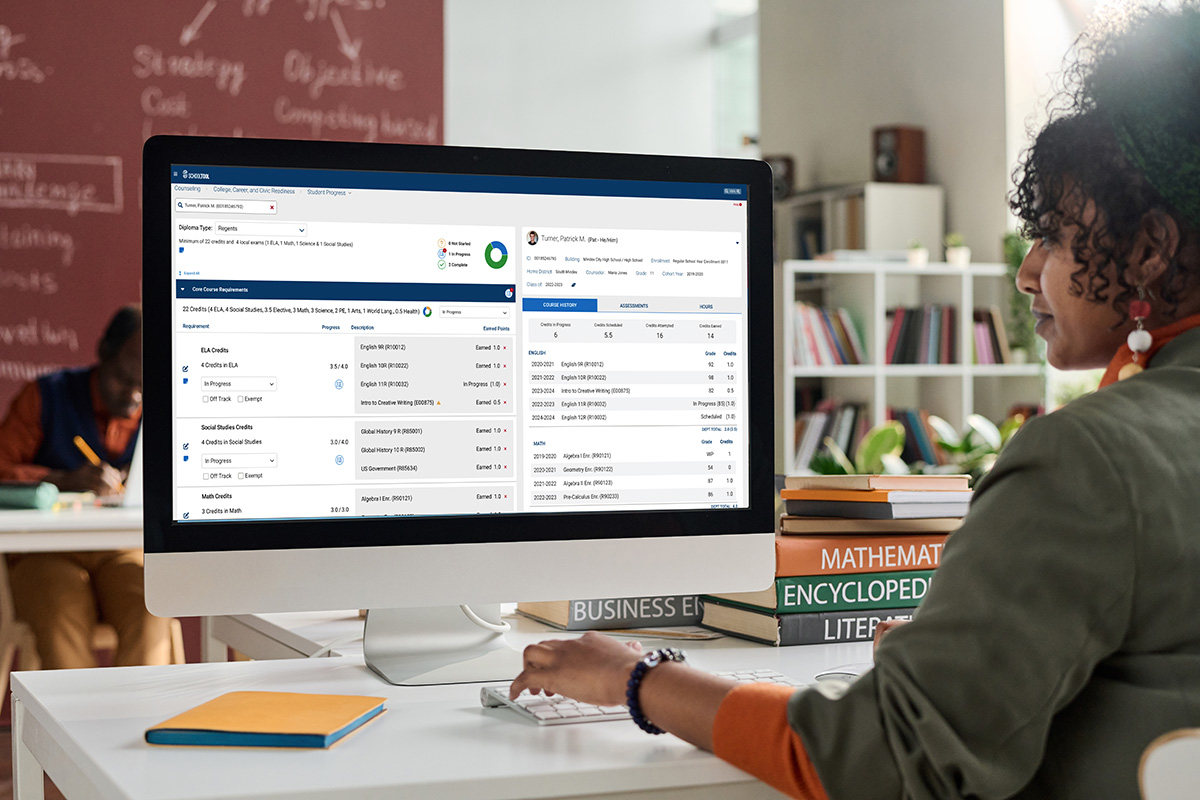
Get a complete, unified view of each student’s Course History, Assessments, and Readiness Hours. As New York moves toward the One Single Diploma, this screen helps counselors see readiness through a more holistic lens and makes it easy to spot strengths, identify gaps, and guide students with confidence.

Explore Course History

View a student’s full academic record—including completed courses, in-progress coursework, and future schedules. Credits are clearly broken out so counselors can see what has been earned, what is in progress, and what is planned for upcoming semesters. Department totals show earned credits alongside the total possible credits in each subject area, giving counselors clear insight into academic progress.

Review Assessments

See an organized snapshot of all assessments a student has taken, grouped by assessment type and school year. Scores, notes, and earned attributes are easy to review, helping counselors understand whether students are meeting required benchmarks and where additional support may be needed.

Monitor Readiness Hours

Track community service, work-based learning, CTE coursework, and other hour-based requirements in one place. Hours are organized by type and school year, with totals that update automatically as students complete experiences. Counselors can quickly identify who is beginning to earn hours, who is on track, and who may need additional opportunities.

Screenshot of the SchoolTool CCCR student view page showing a summary of the student’s progress, including total hours completed, notes, assessments, and overall readiness information.
Track Student Progress Across New York Pathways Feature Image

Track Student Progress Across New York Pathways

CCCR gives counselors a clear, organized view of where students stand across New York’s academic, career, and civic readiness expectations, including emerging requirements under NY Inspires and the One Single Diploma.

Configure Requirements for Graduation Pathways

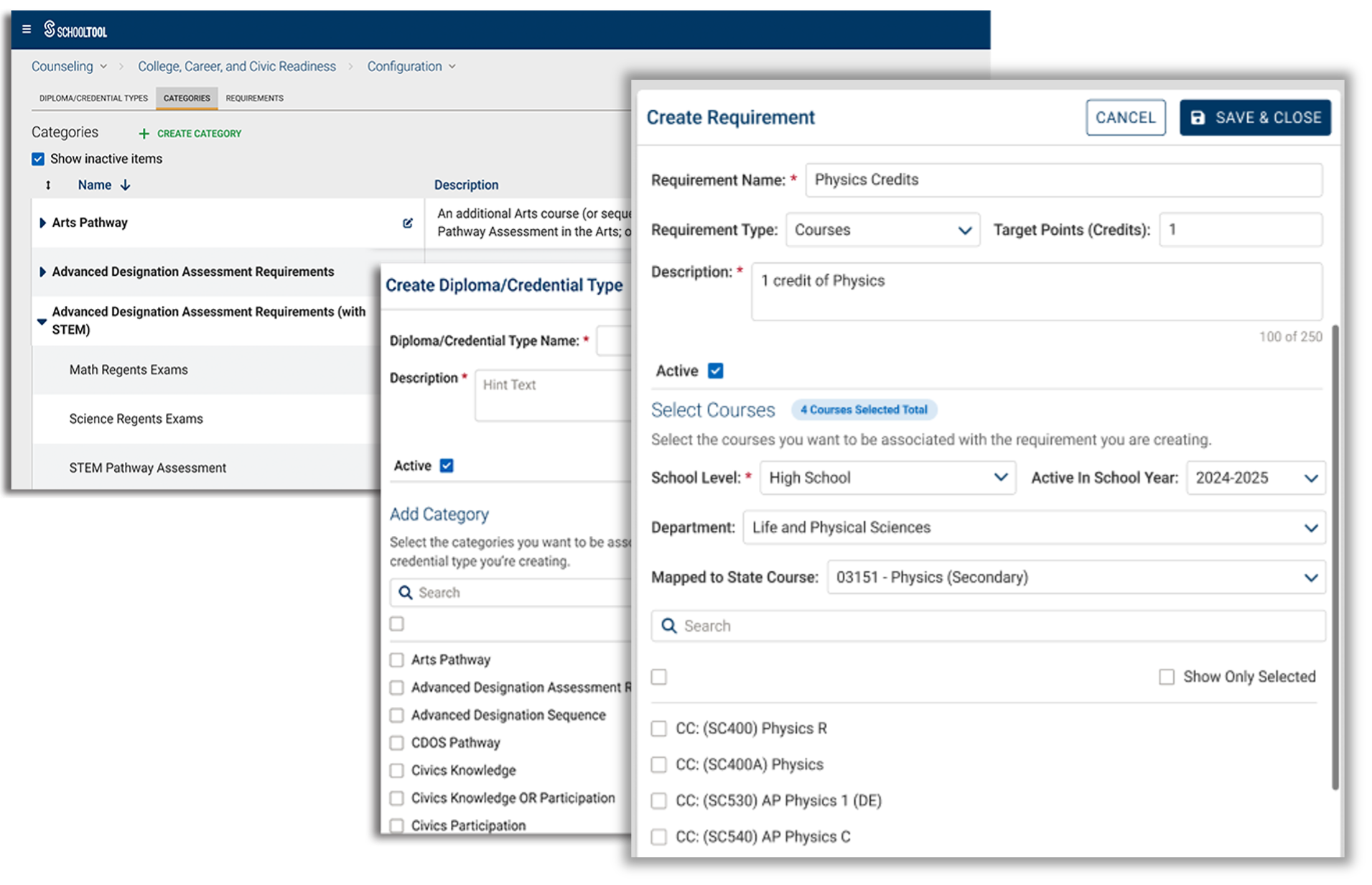
Organize requirements into categories and pathways so districts can clearly represent how students progress toward New York’s graduation options. Admins can fine-tune the structure so counselors see expectations in a clear, intuitive layout.

Align With New York’s Portrait of a Graduate

The Portrait of a Graduate outlines the competencies New York expects students to develop as part of the One Single Diploma. CCCR helps counselors follow these attributes alongside academic and experiential requirements for a full picture of student readiness.

Use Pre-Loaded Templates Aligned With NYSED Standards

CCCR includes pre-loaded templates aligned to NYSED’s guidance for the One Single Diploma, the Portrait of a Graduate, and the Seal of Civic Readiness. Templates cover diploma pathways, cohort-specific requirements, and experience-based criteria and can be refined as state guidance evolves.

Customize Requirements for Local District Needs

Set up courses, assessments, competencies, or hours using points, credits, or yes/no criteria. Districts can mirror local evaluation methods without manual work or duplicating effort.

Configure Requirements for Graduation Pathways
 

Everything You Need to Navigate New York’s Evolving Diploma Requirements

Our CCCR Module Is Now in Beta Testing with Districts Across New York State

Over the past two years, we’ve worked closely with counselors, district leaders, and regional partners across New York State to understand exactly what they need as NY Inspires and the One Single Diploma begin to take shape.

The first set of CCCR features is now in beta testing with districts statewide, and additional functionality will be evaluated throughout the school year. We’ll continue refining the module based on real feedback from the field ahead of general release next school year.
Learn More about Our CCCR Beta Program

CCCR Feature Image

Frequently Asked Questions

Features & Functionality 

BOCES & Regional Coordination

Implementation & Setup 

Training & Support